2.4 Slider — RGB Colour Mixer
Build a visual colour mixer with three sliders for real-time RGB control.
Overview
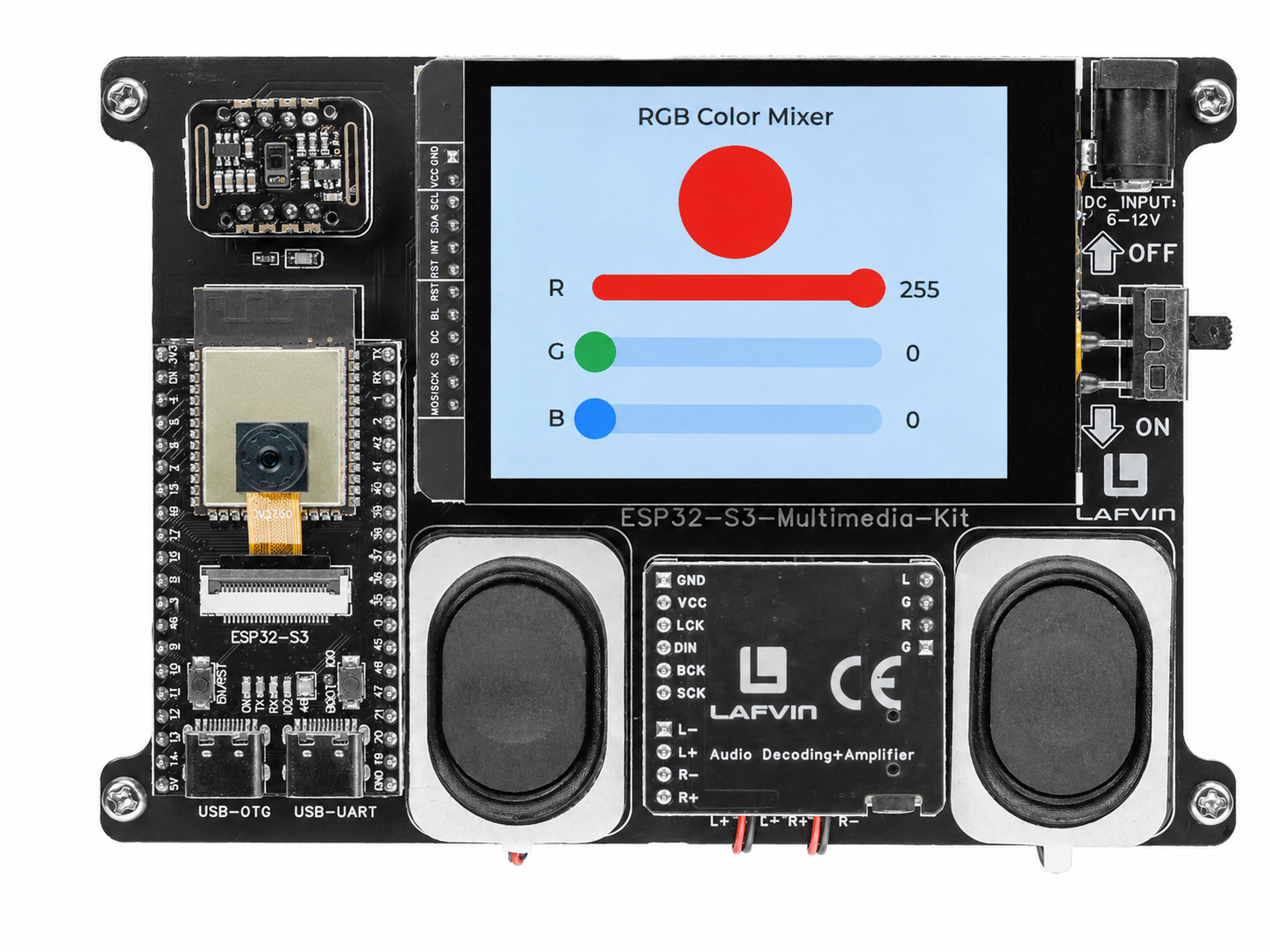
This example demonstrates LVGL slider widgets. Three independent sliders (R, G, B, each ranging from 0 to 255) control the colour of a circular preview object. As you drag any slider, the preview updates in real time — a responsive way to explore the full 24-bit colour space.
What You’ll Learn
Creating and configuring sliders (
lv_slider)Setting slider range, initial value, and visual style
Creating a custom rounded object using
LV_RADIUS_CIRCLEResponding to
LV_EVENT_VALUE_CHANGEDevents
Before You Begin
Complete the setup steps in Preparation before continuing.
Note
Use the recommended Arduino IDE settings in Recommended Board Settings unless this lesson says otherwise.
Open the example sketch from the code package:
LAFVIN-ESP32-S3-Multimedia-Kit-main/2.LVGL/04_LVGL_Slider/04_LVGL_Slider.ino
Upload and Test
Connect the board with a USB Type-C data cable.
Open
04_LVGL_Slider.inoin Arduino IDE.In the Tools menu, select
ESP32S3 Dev Moduleas the board and choose the correct serial port.Click Upload.
The screen shows:
A large circular preview object at the top (starts white)
Three horizontal sliders labelled R, G, B, each with a numeric value display
Drag any slider — the preview circle changes colour instantly
Move all three sliders to mix any colour from the RGB palette
How the Code Works
The demo is self-contained in 04_LVGL_Slider.ino.
Slider Creation Helper
A create_color_slider() helper function encapsulates the repeated pattern of creating a slider, setting its range (0–255), colouring the indicator and knob, attaching a value-change callback, and placing a numeric label to its right. An R/G/B text label is also placed to the left of each slider.
void create_color_slider(lv_color_t color, int y_pos, lv_obj_t ** slider_ptr, lv_obj_t ** label_ptr)
{
  lv_obj_t * slider = lv_slider_create(lv_scr_act());
  lv_obj_set_size(slider, 180, 20);
  lv_obj_align(slider, LV_ALIGN_CENTER, 0, y_pos);
  lv_slider_set_range(slider, 0, 255);
  lv_slider_set_value(slider, 255, LV_ANIM_OFF);

  lv_obj_set_style_bg_color(slider, color, LV_PART_INDICATOR);
  lv_obj_set_style_bg_color(slider, color, LV_PART_KNOB);

  lv_obj_add_event_cb(slider, slider_event_cb, LV_EVENT_VALUE_CHANGED, NULL);

  *slider_ptr = slider;

  lv_obj_t * label = lv_label_create(lv_scr_act());
  lv_label_set_text(label, "255");
  lv_obj_align_to(label, slider, LV_ALIGN_OUT_RIGHT_MID, 10, 0);

  *label_ptr = label;
}
Three sliders are created by calling this helper with red, green, and blue palette colours at increasing Y offsets (20, 60, 100):
create_color_slider(lv_palette_main(LV_PALETTE_RED),   20,  &slider_r, &label_val_r);
create_color_slider(lv_palette_main(LV_PALETTE_GREEN), 60,  &slider_g, &label_val_g);
create_color_slider(lv_palette_main(LV_PALETTE_BLUE),  100, &slider_b, &label_val_b);
Circular Preview Object
The colour preview is a plain lv_obj sized 80×80 with its radius set to LV_RADIUS_CIRCLE, which makes it a perfect circle. It starts white (R=255, G=255, B=255) and is placed top-centre, below the title.
obj_ball = lv_obj_create(lv_scr_act());
lv_obj_set_size(obj_ball, 80, 80);
lv_obj_set_style_radius(obj_ball, LV_RADIUS_CIRCLE, 0);
lv_obj_align(obj_ball, LV_ALIGN_TOP_MID, 0, 30);

lv_obj_set_style_bg_color(obj_ball, lv_color_white(), 0);
Live Colour Update
A single slider_event_cb() callback is shared by all three sliders. On every LV_EVENT_VALUE_CHANGED, it reads the current values of all three sliders, updates the preview ball’s background colour via lv_color_make(), and refreshes the numeric labels.
static void slider_event_cb(lv_event_t * e)
{
  int r = lv_slider_get_value(slider_r);
  int g = lv_slider_get_value(slider_g);
  int b = lv_slider_get_value(slider_b);

  lv_obj_set_style_bg_color(obj_ball, lv_color_make(r, g, b), 0);

  lv_label_set_text_fmt(label_val_r, "%d", r);
  lv_label_set_text_fmt(label_val_g, "%d", g);
  lv_label_set_text_fmt(label_val_b, "%d", b);
}
In the provided sketch:
Each slider starts at maximum (255), so the initial preview colour is white
LV_ANIM_OFFskips the animation when setting the initial slider valuelv_color_make()creates a 16-bit LVGL colour from 8-bit RGB values — the library handles the depth conversion automatically
Try This Next
Change the slider range to 0–100 for percentage-based control
Add a fourth slider for overall brightness
Connect the RGB values to the WS2812 LED as well (see 2.3 Switch and Checkbox — RGB LED Control)